Quick answer
Enter your date of birth and license number at the Department of Transport Management's checker, applydlnew.dotm.gov.np/licensecheck. The department says every card pending to the end of Asar 2083 has been printed, and 27,47,253 cards were posted to transport offices by 7 Shrawan 2083, so most people can collect theirs now from their transport office.
Is my license printed? What to do now
| Check it | applydlnew.dotm.gov.np/licensecheck — your date of birth (AD) and license number. Or your office's printed list on dotm.gov.np (table below). |
|---|---|
| Passed your trial before Shrawan 2083 | Printed and posted to your office, unless under a year was left on it (next line). The department printed every card pending to Asar-end 2083 and had sent 27,47,253 by 7 Shrawan 2083. |
| Under a year left on the license | Not printed in that run. Renew it instead: a renewed license is valid 10 years. |
| Applied on the province site since Shrawan 2083 | Your transport office prints and hands over the card. Follow it with Application tracking on your province site. |
| Bring to collect | The department lists the original fee receipt, and your old license for a renewal or an added category. Take your citizenship certificate or National ID too; offices may ask for it. |
| Stuck | Your transport office, or the department: 01-4574921, 01-4574922, gunaso@dotm.gov.np |
From the Department of Transport Management's announcement of 13 Shrawan 2083 and its citizen charter. Each line is explained, with its source, below.
Most people searching this applied months or years ago and are still waiting. The department's own announcement answers most of them: the backlog was printed and posted to the offices in Shrawan 2083. This page gives the official ways to check, what each answer means, how long printing takes, what to do when your card is missing, and what to bring to collect it. We do not run a search of people's names and license numbers; the department's checker and its own lists are the places to look.
On this page
- License print check online, step by step
- Other official ways to check, and two that are not
- What your result means, and what to do
- How long does license printing take?
- License not printed? What to do
- Collecting your smart card: what to bring
- Going abroad: urgent printing
- License print check by office
License print check online, step by step
- 1Open applydlnew.dotm.gov.np/licensecheck, the address the department's citizen charter gives for your smart-card license details. The page is headed Smart-Card License Search.
- 2Type your date of birth in AD, as year-month-day (2003-04-15), which is how the box asks for it. Know it only in BS? Our Nepali date converter gives the AD date.
- 3Type your license number as the box shows it: XX-XX-XXXXXXXX (two digits, two digits, eight digits).
- 4Type the captcha and press Search License.
- 5Read the answer against the table further down: found and sent to an office, or not found.
Other official ways to check, and two that are not
The department's checker is not the only place. Its own lists, your province's licence site and your transport office all answer the same question.
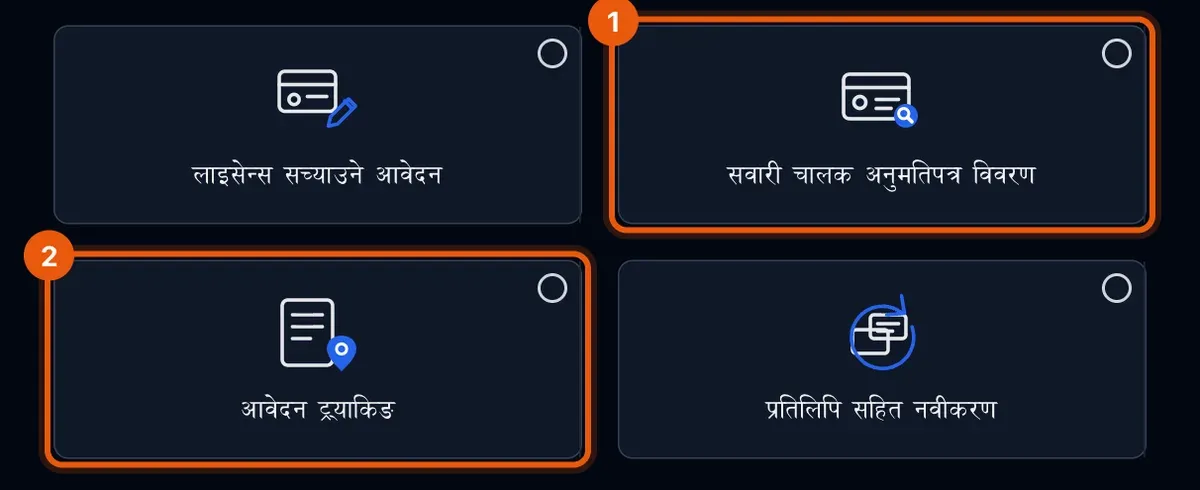
On your province's licence site (here Bagmati's, edlvrs.bagamati.gov.np), 1 is Driving License Details and 2 is Application Tracking. Both send an OTP to your mobile before they show anything.
| Way | What you need | What it tells you |
|---|---|---|
| DoTM checker (applydlnew.dotm.gov.np/licensecheck) | Date of birth in AD and license number | Your smart-card license's details, as the charter describes it. What it shows for a card not yet printed could not be confirmed: it would not load on 28 Nov 2026 |
| DoTM's printed lists on dotm.gov.np, one PDF per office | Your license number; open the PDF and use Find in page | That your card was printed and sent to that office; the charter sends you to dotm.gov.np for print status. Posted now and then, not for every office (table below) |
| Province site: Driving License Details (सवारी चालक अनुमतिपत्र विवरण) | License number, date of birth, and an OTP to the mobile linked to the license | Your license record, up to twice a day. The site does not call it a print check |
| Province site: Application Tracking (आवेदन ट्र्याकिङ) | Your application ID (like R05831) and an OTP | The stage an application made on the province site has reached |
| The department's Facebook page | Nothing | For urgent (abroad) printing: the charter says the page tells you once it is printed, at least 72 hours after approval |
| Your transport office | A visit or a phone call | Everything, including a card that is on no list |
| SMS "LC <number>" to 31003, 34949 or 33001 | Not official | Repeated by private sites; no department or telecom page we could find lists it, so we cannot say it works |
| Nagarik App | Not a print check | Its FAQ lists the driving license among the documents it links; no official page describes a print status in it |
What your result means, and what to do
The department's earlier print-check page answered with the holder's name, the category, the dispatch date (प्रेषण मिति) and the office the card was sent to (शाखामा पठाइयो). The current checker may lay its answer out differently; those are the two things to read in it.
| You see | What it means | Do this |
|---|---|---|
| Found, with a dispatch date and an office | Your card is printed and was sent to that office | Collect it there, with the papers listed below |
| Not found, and you passed the trial before Shrawan 2083 | The department says it printed every card pending to the end of Asar 2083, so a miss is usually a typing error or a license close to expiry | Check the date (AD) and the number. Under a year left on the license? Renew. Otherwise ask the office that issued it |
| Not found, and you applied on the province site since Shrawan 2083 | Cards from the new system are printed and handed over by the transport office itself | Open Application Tracking on your province site, then ask the office |
| "No licence record was found for these details" on the province site | The licence number or date of birth does not match | Pick the right number format (the site asks: old or new) and check the date |
How long does license printing take?
- Urgent printing, for people going abroad to work or study: at least 72 hours after the application is approved, in the department's citizen charter.
- Regular printing has no fixed time in any official page. The department's announcement of 13 Shrawan 2083 says printing had been held up for four years by its machines, staff, software and resources. It signed with the Security Printing Centre on 12 Kartik 2082 (29 October 2025), printed every license pending to the end of Asar 2083, and by 7 Shrawan 2083 (23 July 2026) had posted 27,47,253 cards (about 2.75 million) to the transport offices.
- Since Shrawan 2083, the same announcement says, printing and handing over are done by the office concerned "immediately". That is the department's word for it, not a measured time; ask your office what it means there.
License not printed? What to do
- 1Check what you typed. The date of birth goes in AD; the license number as XX-XX-XXXXXXXX. On the province site, choose whether your number is in the old or the new format.
- 2Under a year left on the license? It was not printed. Renew it on your province's site; see the driving license online form for the site and the steps.
- 3Passed the trial before Shrawan 2083? The card was posted to the office that issued your license. Go there, or phone, with your receipt.
- 4Applied on the province site since then? Open Application Tracking. The site's own advice, if your application is not approved within 48 hours: visit the office with your original citizenship certificate and National ID.
- 5Something wrong on the card? The province site's License correction copies your National ID's details onto the license, so correct the National ID first if that is where the mistake is.
- 6Still stuck? Write to the department at gunaso@dotm.gov.np or call 01-4574921 or 01-4574922. Each province's own help address is in the online form guide.
Collecting your smart card: what to bring
That is the department's own list, in its citizen charter, for the urgent cards it hands out at Minbhawan. Transport offices run their own counters, and the cards posted to them are handed out there; take the same papers, and your citizenship certificate or National ID.
- The original revenue (fee) receipt for a new license.
- For a renewal or an added category: the receipt and your old original license.
- Someone collecting for you brings their own application and your consent (मञ्जुरीनामा) in the form the department's Urgent Driving License Printing Directive, 2081 sets out (its Schedule 5).
- Free, and the same day.
Going abroad: urgent printing
- The department's announcement of 13 Shrawan 2083 sends people who need a card fast for foreign employment to their transport office.
- Its citizen charter still describes the online route: apply at applydlnew.dotm.gov.np/login, and the card is ready at least 72 hours after approval.
- What the charter asks for: study — the No Objection Certificate or Certificate of Eligibility, the university offer letter, passport, visa and ticket; work — passport, visa or residential card, ticket and work permit (labour approval). For the approval itself, see shram swikriti.
License print check by office
Most searches name an office: Ekantakuna, Chabahil, Butwal, Pokhara. Your card goes to the office that issued your license, and the checker above works the same for every office. The department has also posted a printed list for some offices; the latest for each is below, linked to the department's own page (it opens a PDF of names and numbers).
22 offices
| Transport office | Province | Department's latest printed list |
|---|---|---|
| Chabahil, Kathmandu (चाबहिल) | Bagmati | 8 Baishakh 2083 |
| Thulo Bharyang, Kathmandu (ठूलो भर्याङ) | Bagmati | 3 Baishakh 2083 |
| Radhe Radhe, Bhaktapur (राधेराधे) | Bagmati | 5 Jestha 2083 |
| Bharatpur, Chitwan (भरतपुर) | Bagmati | 7 Jestha 2083 |
| Pokhara, Kaski (पोखरा) | Gandaki | 22 Asoj 2083 |
| Baglung (बागलुङ) | Gandaki | 5 Jestha 2083 |
| Tulsipur, Dang (तुल्सीपुर) | Lumbini | 5 Jestha 2083 |
| Janakpur (जनकपुर) | Madhesh | 5 Jestha 2083 |
| Kalaiya, Bara (कलैया) | Madhesh | 5 Jestha 2083 |
| Bardibas (बर्दिबास) | Madhesh | 5 Jestha 2083 |
| Lahan (लहान) | Madhesh | 5 Jestha 2083 |
| Malangwa, Sarlahi (मलंगवा) | Madhesh | 7 Baishakh 2083 |
| Gaur, Rautahat (गौर) | Madhesh | 3 Baishakh 2083 |
| Rajbiraj, Saptari (राजविराज) | Madhesh | 8 Baishakh 2083 |
| Itahari, Sunsari (इटहरी) | Koshi | 8 Baishakh 2083 |
| Gaighat, Udayapur (गाईघाट) | Koshi | 3 Baishakh 2083 |
| Okhaldhunga (ओखलढुङ्गा) | Koshi | 8 Baishakh 2083 |
| Chaurjahari, Rukum West (चौरजहारी) | Karnali | 8 Baishakh 2083 |
| Dhangadhi, Kailali (धनगढी) | Sudurpashchim | 4 Jestha 2083 |
| Mahendranagar, Kanchanpur (महेन्द्रनगर) | Sudurpashchim | 5 Jestha 2083 |
| Dadeldhura (डडेलधुरा) | Sudurpashchim | 8 Baishakh 2083 |
| Dipayal, Doti (दिपायल) | Sudurpashchim | 8 Baishakh 2083 |
Common questions
How can I check if my driving license is printed in Nepal?
Enter your date of birth (AD) and license number at applydlnew.dotm.gov.np/licensecheck, the Department of Transport Management's checker. For print status, the department's citizen charter points to dotm.gov.np, where it posts a printed list for some offices: look for your number in your office's list, or ask the office.
My license was not printed for months. Is it printed now?
Most likely. The department's announcement of 13 Shrawan 2083 says it printed every license pending to the end of Asar 2083 and had posted 27,47,253 cards to the transport offices by 7 Shrawan 2083. Licenses with under a year of validity left were not printed; renew those.
How many days does it take to print a driving license in Nepal?
Urgent printing takes at least 72 hours after approval, in the department's citizen charter. No official page gives a time for regular printing; since Shrawan 2083 the transport offices print and hand over the cards themselves.
Is there an SMS to check license print status?
Private sites repeat "LC" followed by your license number, sent to 31003, 34949 or 33001. No page of the Department of Transport Management or a telecom company that we could find lists it, so we cannot say it works. The checker and your office are official.
Can I check license print status in the Nagarik App?
The Nagarik App links your driving license details, as its FAQ says, but no official page describes a print status in it. Use the department's checker or your province site's Driving License Details.
Where do I collect my smart card license?
At the transport office that issued your license: the backlog cards were posted to the offices, and new cards are printed by the office. Urgent cards printed by the department are collected at Minbhawan, Kathmandu.
What documents do I need to collect my license?
The department's citizen charter lists the original fee receipt, and for a renewal or an added category your old original license too. Someone collecting for you needs your consent in the department's format and an application, and it is free. That list is for the urgent cards the department hands out itself; at a transport office, take your citizenship certificate or National ID as well.
Can I check my license print by name?
The department's current checker asks for your date of birth and license number, not your name. If you do not know the number, ask the office that took your application.
In this topic
Licences and government exams
The driving licence from form to trial, Lok Sewa, and the teaching licence.
Driving licence
- Driving licence online form
- License print check
- Likhit exam mock test
- Likhit questions for bike and scooter
- Likhit questions for car
- Traffic signs in Nepal
Government jobs