Quick answer
To make a CV with ChatGPT, give it your real details or let it interview you, tell it to use only your facts and mark anything missing with [ ], then check every line. ChatGPT writes the words but not the document: paste its answer into a CV maker such as CareerKyt's, which lays it out and downloads it as a PDF or Word file, free.
ChatGPT is very good at the part of a CV people find hardest — turning "I did accounts at a shop" into three clean bullet points. It is bad at the parts that get a CV rejected: it invents numbers, it drifts into the same polished phrases everyone else's AI uses, and it hands you text, not a document. Here is how to get the first without the rest.
On this page
- Can ChatGPT make a CV?
- Step 1 — Put your facts down first (or let ChatGPT ask)
- Step 2 — Give ChatGPT a prompt that forbids inventing
- Step 3 — Check what it wrote, line by line
- Step 4 — Turn ChatGPT's answer into a PDF or Word CV
- Make it fit one job: give ChatGPT the job advert
- ChatGPT, Gemini, Claude or Copilot?
- Mistakes that give an AI-written CV away
Can ChatGPT make a CV?
It can write one — the summary, the bullet points, the order of sections — and the free version is enough. What it cannot do well is the CV as a document. Ask for a file and you get a plain one whose layout changes every time you ask; ask in the chat and you get text with stars and hashes in it that will not paste cleanly into Word.
The bigger risk is invention. Asked to make a CV "impressive", ChatGPT adds what it thinks belongs there: a percentage you never measured, a skill you never used, a year that is out by one. An interviewer who asks about that line will find out in a minute. So the prompt has to forbid it, and you have to check.
| Part of the CV | ChatGPT | You, or a CV maker |
|---|---|---|
| Turning rough notes into bullet points | Does it well | Check each one is true |
| A two- or three-line summary | Does it well, if told your target job | Cut the clichés |
| Your dates, grades and numbers | Invents them if allowed | Give them; check them |
| Layout, fonts, photo, page breaks | Plain, and different each time | A CV maker or template |
| A PDF or Word file | Basic, when it can make one | Download from the CV maker |
Step 1 — Put your facts down first (or let ChatGPT ask)
The CV can only be as true as what you give ChatGPT. Spend ten minutes writing your facts in a note — rough is fine, in English, Nepali or a mix. If you would rather not, skip this: the first prompt below makes ChatGPT interview you, one question at a time.
- Your full name, phone, email and city.
- The job you want next — one job title, not "any suitable post".
- Education: degree or level, college or school, the years, a grade if it helps.
- Every job, internship or volunteering role: the title, the place, the dates, what you did on a normal day, and any number you actually know (bills a day, customers served, students taught).
- Skills you could demonstrate in an interview, languages, and training with who gave it.
Step 2 — Give ChatGPT a prompt that forbids inventing
The difference between a usable answer and a risky one is mostly the prompt. Both of these tell ChatGPT to use only your facts, to write [ ] where something is missing instead of guessing, and to keep the format plain enough to paste. "Open in ChatGPT" opens it with the prompt already typed in; press send.
I want to write my CV. Interview me first: ask me ONE short question at a time, in simple language, about my full name, the job I want, my phone, email and city, my education, my work, internships or volunteering (what I did and any numbers), my skills, languages and training. Wait for each answer.

When you have enough, write my CV with these rules:
1. Use only facts I gave you. Never invent employers, dates, grades, numbers or skills. Where the CV needs something I didn't say, write a gap like [year] or [college name].
2. A summary of 2–3 lines, under 50 words, aimed at the job I want.
3. For each role, 2–4 bullet points that start with an action verb, using my numbers where I gave them.
4. Newest first in experience and education.
5. Plain text with simple headings — no tables, no stars, no emojis.
Write my CV for a [job title] job from the notes below.

Rules:
1. Use only facts in my notes. Never invent employers, dates, grades, numbers or skills. Where the CV needs something I didn't give, write a gap like [year] instead of guessing.
2. Sections: name and contact, summary (2–3 lines), experience, education, skills, languages, training.
3. For each role, 2–4 bullet points starting with an action verb, with my numbers where I gave them.
4. Write in [English / Nepali]. Keep names of people, companies and colleges as they are.
5. Plain text with simple headings — no tables, no stars, no emojis.

My notes:
[paste your notes here]
Step 3 — Check what it wrote, line by line
Read ChatGPT's answer as if a stranger had written it about you, because in a sense one has. Every line should be something you can talk about for a minute in an interview.
- Every number is yours. If you did not count it, delete it or replace it with what you know.
- Every [ ] gap is filled or deleted. Never leave the brackets in, and never let ChatGPT fill them by guessing.
- Dates match your certificates — Bikram Sambat or AD, the same way throughout.
- Names are untouched. Translation sometimes "corrects" a college or company name into something that does not exist.
- The summary names your target job and one or two real strengths, not "a results-driven, highly motivated professional".
- The verbs vary. Five bullets in a row starting "Spearheaded" or "Leveraged" is the clearest sign of an AI CV.
Step 4 — Turn ChatGPT's answer into a PDF or Word CV
Copying the text into a Word template works, but it is slow and the formatting fights you. A CV maker does it in one step. On CareerKyt it goes like this — the whole way on a phone, free, with no account:
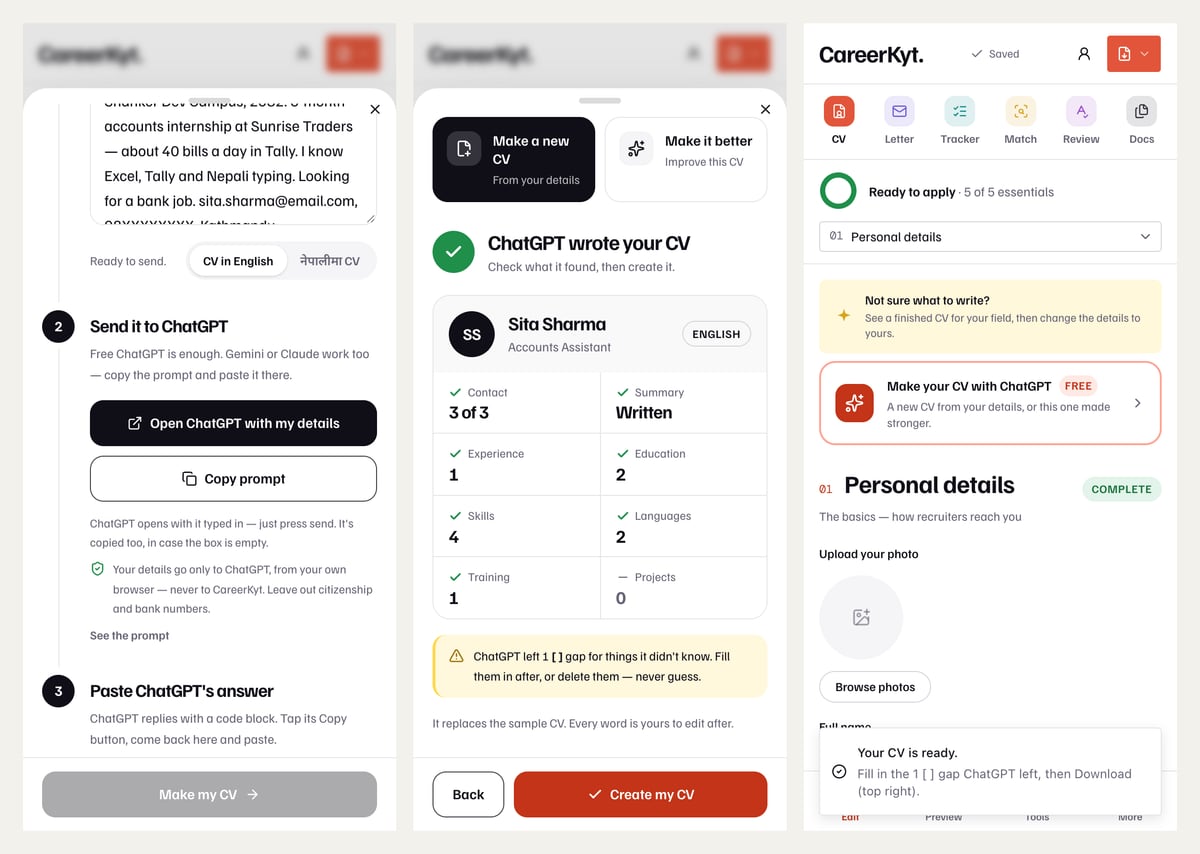
- 1Open the CV builder with ChatGPT. The popup opens on Make a new CV.
- 2Write your notes in the box, or leave it empty to be interviewed. Pick CV in English or नेपालीमा CV.
- 3Tap Open ChatGPT with my details. ChatGPT opens with the prompt typed in (it is copied too, in case the box is empty). Press send and answer its questions.
- 4ChatGPT replies with a code block. Tap its Copy button, come back, and tap Paste, then Make my CV.
- 5Check what it found — contact, summary, jobs, education, skills, and any [ ] gaps — and tap Create my CV.
- 6Fill the gaps, pick a design, add a photo if the job expects one, and Download a PDF or a Word file.
Make it fit one job: give ChatGPT the job advert
A CV aimed at one advert beats a general one. Once your CV is made, give ChatGPT the advert and ask what to change — not to rewrite everything. The prompt below asks for the changes as a list, so you decide which are true.
Here is a job advert and my CV.

1. List the 8 skills or requirements the advert cares about most, in its own words.
2. For each, say where my CV already shows it, or "not shown".
3. Suggest changes to my summary and bullet points that use the advert's words where they are TRUE for me. Do not add skills or experience I don't have — if something is missing, tell me instead.

Job advert:
[paste the advert]

My CV:
[paste your CV]
ChatGPT, Gemini, Claude or Copilot?
Any of the four free assistants can do this, and the prompts on this page work in all of them — paste the prompt in the same way, then copy the answer back. What matters more than which one is the rules in the prompt and your check afterwards.
For more — summaries, bullet points, a CV for abroad, a cover letter — see ChatGPT prompts for a CV. For a photo, see ChatGPT prompts for a CV photo.
Mistakes that give an AI-written CV away
- The cliché summary — "dynamic, results-driven professional with a proven track record". Say what you do and for whom.
- Numbers nobody can explain. "Increased efficiency by 37%" is worse than no number if you cannot say how it was measured.
- The wrong country's format. ChatGPT defaults to an American resume. A CV for Nepal or the Gulf usually has a photo and personal details; one for the UK or Canada does not — see CV format for abroad.
- Long words where short ones work — "utilised", "facilitated", "spearheaded".
- Tables and columns from the chat pasted into Word. Some application systems read them in the wrong order; see ATS-friendly CV.
CV examples by field
Complete CVs to start from — open one, put your details in, download it as PDF or Word.
Common questions
Can ChatGPT make a resume for free?
Yes. The free version of ChatGPT can write every section of a CV or resume from your details. It does not give you a designed document, so paste its answer into a CV maker — CareerKyt's is free, needs no sign-up and downloads a PDF or Word file.
Is it okay to use ChatGPT to write my CV?
Yes, as long as every fact on it is yours and you have checked it. Employers judge the CV on whether it is true and relevant. What hurts is invented detail and generic wording, both of which come from a careless prompt rather than from using ChatGPT at all.
Can employers tell if I used ChatGPT?
Not reliably by software, but readers notice the same phrases ChatGPT gives everyone — "results-driven", "spearheaded", a summary that could be anyone's. Specific facts, your own numbers and plain verbs make a CV read as yours, however it was drafted.
Can ChatGPT give me my CV as a PDF?
Sometimes it can produce a file, but the layout is plain and changes each time. A CV maker gives a consistent design: on CareerKyt you paste ChatGPT's answer once and download the CV as a PDF or Word file.
Can ChatGPT write my CV in Nepali?
Yes. Write your notes in Nepali, English or both and ask for the CV in Nepali. Check names of people, places and colleges afterwards — translation can change them. CareerKyt's builder has a नेपालीमा CV option that asks ChatGPT for Nepali directly.
Does CareerKyt see what I send to ChatGPT?
No. The prompt goes from your browser to ChatGPT, and ChatGPT's answer is pasted back into the page on your device. CareerKyt keeps the CV on your device unless you sign in to sync it.
In this topic
CV and cover letter
What goes on a CV in Nepal, how to write each part, and a template to start from.
CV format in Nepal — the whole subject in one place
Writing it
- How to write a CV
- CV vs resume vs biodata
- Career objective for a CV
- Skills for a CV
- ATS-friendly CV
- How to make a CV with ChatGPT
- ChatGPT prompts for a CV
- ChatGPT prompts for a CV photo
- Cover letter format
- Email for a job application
- CV कसरी बनाउने (in Nepali)
- CV को ढाँचा (in Nepali)
- कभर लेटर कसरी लेख्ने (in Nepali)
Starting from