Quick answer
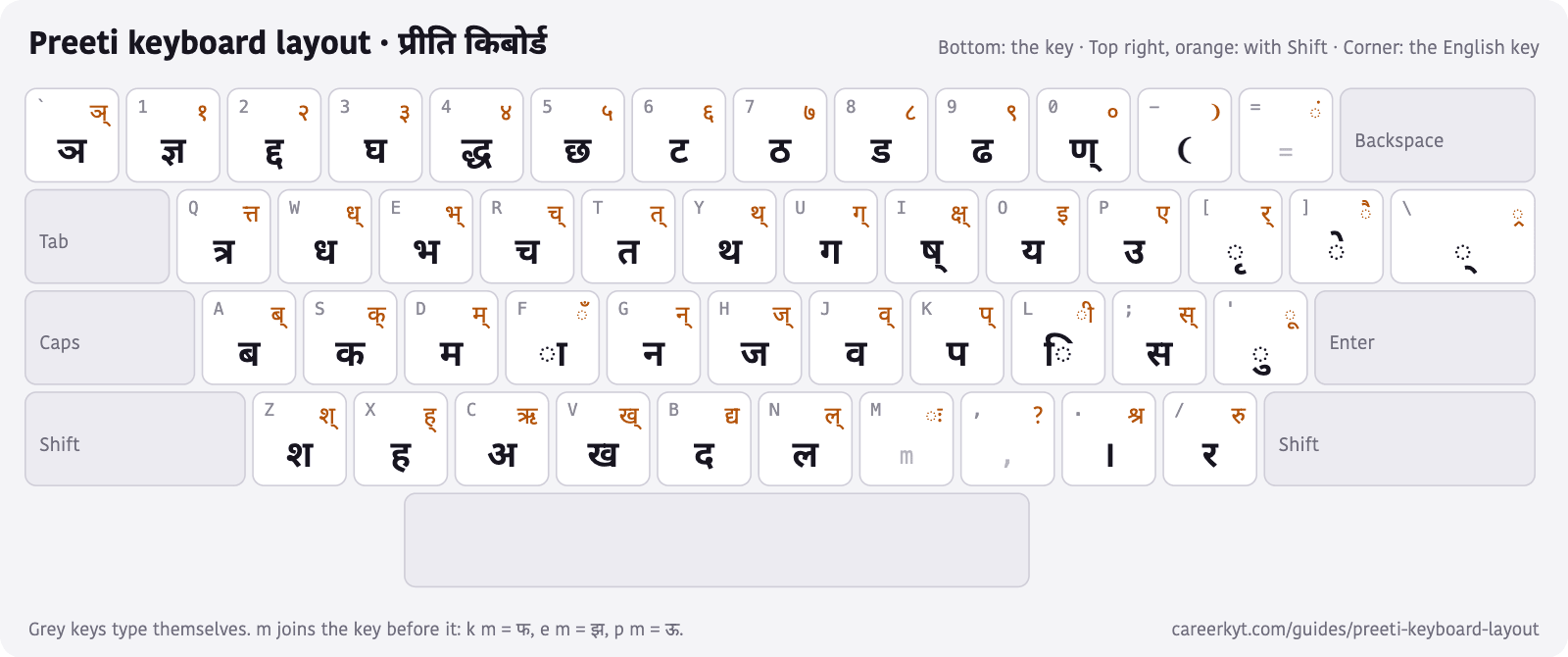
On the Preeti layout each English key types a Nepali letter: s is क, k is प, f is ा, l is ि and ] is े. Shift gives the half letter or the next sign — S is क्, F is ँ, L is ी. The number row types conjuncts (1 is ज्ञ, 4 is द्ध) and, with Shift, Nepali numerals: Shift + 1 is १.
Preeti is the Nepali font that draws Devanagari on an ordinary English keyboard: the file holds English letters, the font turns them into Nepali. Many offices and presses still use it, and anyone handed Preeti work needs the layout. Below is every key, drawn from a converter that reads Preeti text, the letters that take two keys, the Alt codes for the rest, and a PDF to print and keep beside the keyboard.
On this page
Preeti keyboard layout
Each key shows the English key in its corner, what it types with Shift at the top right, in orange, and what it types without Shift at the bottom. Download the layout as a PDF (A4, landscape, to print) or as a picture.
Letters that take two keys
Preeti builds some letters from two or three keystrokes — the vowel signs and the m key join what came before them:
| Letter | Keys | Preeti text |
|---|---|---|
| आ | c + f | cf |
| ओ | c + f + ] | cf] |
| औ | c + f + } | cf} |
| ई | O + { | O{ |
| ऊ | p + m | pm |
| ऐ | P + ] | P] |
| ण | 0 + f | 0f |
| ष | i + f | if |
| क्ष | I + f | If |
| फ | k + m | km |
| झ | e + m | em |
| क्र | q + m | qm |
| क्त | Q + m | Qm |
| फ्र | k + | + m | k|m |
How to type ि, र्, half letters and ्र in Preeti
- ि (hrasva i): press l first, then the letter — l z for शि, as in l z I f f = शिक्षा.
- ी: Shift + L, after the letter.
- Half letters: Shift with the letter — S is क्, K is प्, G is न् — then the next letter: S t is क्त.
- ्र (the r below): | (Shift + \) after the letter — k | ] d is प्रेम.
- र् (reph, the r above): { (Shift + [) after the letter it sits on — s f o { is कार्य.
- ् (halant): \ on its own.
- ं ँ ः: Shift + = (ं), Shift + F (ँ), Shift + M (ः).
Nepali numbers in Preeti
Shift and the number row: the number keys alone type conjunct letters, so the numerals sit on Shift.
| Numeral | Keys | Without Shift, the same key types |
|---|---|---|
| १ | Shift + 1 | ज्ञ |
| २ | Shift + 2 | द्द |
| ३ | Shift + 3 | घ |
| ४ | Shift + 4 | द्ध |
| ५ | Shift + 5 | छ |
| ६ | Shift + 6 | ट |
| ७ | Shift + 7 | ठ |
| ८ | Shift + 8 | ड |
| ९ | Shift + 9 | ढ |
| ० | Shift + 0 | ण् |
Preeti Alt codes and shortcut keys
Some Preeti letters are not on any key. On Windows, hold Alt and type the four digits on the number pad (not the row above the letters), with the document in the Preeti font. A Mac has no Alt codes; there, copy the character from a converter or a character map.
| Character | Alt code | Preeti text |
|---|---|---|
| ॐ | Alt+0231 | ç |
| ऽ | Alt+0152 | ˜ |
| ज्ञ् | Alt+0161 | ¡ |
| द्घ | Alt+0162 | ¢ |
| द्म | Alt+0223 | ß |
| त्र | Alt+0204 | Ì |
| ध्र | Alt+0132 | „ |
| ङ्घ | Alt+0139 | ‹ |
| ड्ड | Alt+0149 | • |
| द्र | Alt+0155 | › |
| ट्ट | Alt+0167 | § |
| ड्ढ | Alt+0176 | ° |
| ठ्ठ | Alt+0182 | ¶ |
| रू | Alt+0191 | ¿ |
| हृ | Alt+0197 | Å |
| ङ्ग | Alt+0203 | Ë |
| ङ्क | Alt+0205 | Í |
| ङ्ख | Alt+0206 | Î |
| ट्ठ | Alt+0221 | Ý |
| द्व | Alt+0229 | å |
| ट्र | 6 then Alt+0171 | 6« |
| ठ्र | 7 then Alt+0171 | 7« |
| ड्र | 8 then Alt+0171 | 8« |
| ढ्र | 9 then Alt+0171 | 9« |
| ड़ | 8 then Alt+0222 | 8Þ |
| ढ़ | 9 then Alt+0222 | 9Þ |
| घ् | Alt+0163 | £ |
| ङ | Alt+0170 | ª |
| झ् | Alt+0137 | ‰ |
| झ | Alt+0180 | ´ |
| फ् | Alt+0136 | ˆ |
| ्य | Alt+0216 | Ø |
| ऑ | c then f then Alt+0145 | cf‘ |
| ॉ | f then Alt+0145 | f‘ |
Practise Preeti and convert it
- The typing test has a Preeti mode: type with this layout on a normal keyboard and it converts and checks what you type, shows the Preeti keys for the next word, and needs no Preeti font installed.
- Preeti to Unicode turns a Preeti file's text into Unicode that works in Facebook, Gmail and online forms.
- Unicode to Preeti does the reverse, for a press or an office template that still expects Preeti.
- Nepali Unicode typing is the easier way when Preeti is not required: type in English letters, get नेपाली.
Common questions
How do you type ukar (ु) in Preeti font?
With the apostrophe key, ', after the letter: s ' is कु. Shift + ' (") types ऊकार, ू: s " is कू.
How do you type jha (झ) in Preeti font?
Type e then m: em is झ. The single character ´ (Alt+0180) types झ too.
How do you type nga (ङ) in Preeti font?
ङ is not on a key: hold Alt and type 0170 on the number pad. Common conjuncts with it have codes of their own: ङ्ग is Alt+0203, ङ्क Alt+0205, ङ्ख Alt+0206 and ङ्घ Alt+0139.
How do you type pra (प्र) in Preeti?
k then | (Shift + \): k| is प्र. The same | adds the r below any letter — q is already त्र and qm is क्र.
How do you type Nepali numbers in Preeti?
Shift and the number key: Shift + 1 is १, Shift + 2 is २, and so on to Shift + 0 for ०. Without Shift the number keys type ज्ञ, द्द, घ, द्ध, छ, ट, ठ, ड, ढ and ण्.
How do you type ॐ in Preeti?
Alt+0231 on the number pad, in a document set in the Preeti font.
How do you type ऋ and ृ in Preeti?
Shift + C types ऋ, and [ types the vowel sign ृ after a letter: x [ is हृ (which also has its own code, Alt+0197).
What is the difference between Preeti and Unicode?
Preeti stores English letters and needs its font to look Nepali; Unicode stores the Nepali letters themselves and reads correctly everywhere. Text typed in Preeti and sent to someone without the font arrives as g]kfn instead of नेपाल — which is what the Preeti to Unicode converter fixes.
In this topic
Typing Nepali
Preeti and Unicode, the keyboard layout, and a typing test for both.
Preeti
- Preeti keyboard layout, with Alt codes
- Preeti to Unicode converter
- Unicode to Preeti converter
Typing Nepali