In short
A leave application (बिदाको निवेदन) is a short letter asking your office head or principal to approve leave. It has six parts: the date, who it is addressed to, a subject line (विषय), who you are, the dates and number of days with the reason, and your name and signature. Hand it in before the leave starts, or on the first day you can if you are sick.
A बिदाको निवेदन is the short letter you hand in before you are away: to your office head if you are an employee, to the principal if you are a teacher or a student. It says who you are, which days you need, why, and who covers your work. Choose who is asking and the kind of leave, and the subject line and the opening sentence are written for you in Nepali or English.
On this page
बिदाको निवेदन लेख्ने तरिका — the six parts
मिति (date). The day you hand it in, at the top right. BS is usual in a Nepali letter.
Who it is addressed to. श्रीमान् प्रमुख ज्यू for an office, श्रीमान् प्रधानाध्यापक ज्यू for a school, then the name of the office or school.
विषय (subject). One line that names the leave: बिरामी बिदा स्वीकृत गरिपाऊँ भन्ने बारे।
Who you are. Your post and department, or your class and roll number. One sentence.
The dates, the number of days and the reason. From which day to which day, how many days in all, and why, in a sentence. This is the part the person approving it reads.
निवेदक (your name and signature). With your post or class under it, and a phone number if you will be away from the office.
Office, teacher or student
An employee writes to the head of the office or to their own manager, names the post they hold, and says who will look after their work.
A teacher writes to the principal (प्रधानाध्यापक), and it helps to say which classes need covering and by whom.
A student writes to the principal or the class teacher and gives the class, section and roll number. For a young child a parent signs.
The form asks which of the three you are and changes the opening sentence to match. The full leave application format guide has a sample for each, and one to send by email.
Sick leave, and what to attach
For sickness, hand the letter in on the first day you can, or have someone bring it. Say that you are unwell and for how many days; you do not have to describe the illness.
For more than a few days most offices and schools ask for a doctor's note or a prescription. List it under Attachments and it prints at the foot of the letter, so nobody has to ask where it is.
How many days of sick leave, home leave or festival leave you may take is set by your office's rules and your appointment letter. Nepal's Labour Act sets minimums for annual and sick leave and many employers give more, so check there before you count on a number.
Nepali or English
Write it in the language your office works in. A school, a cooperative, a local-government office and most Nepali companies expect Nepali; an international organisation or a software company usually expects English.
Switch the document language above the form and every fixed phrase changes with it. What you type yourself — your name, the reason — is never translated, so type it in the language of the letter.
Leaving the job and not just taking leave? That is a resignation letter (राजीनामा पत्र). An application to the ward office for a recommendation is a different paper again: the निवेदन tool writes those.
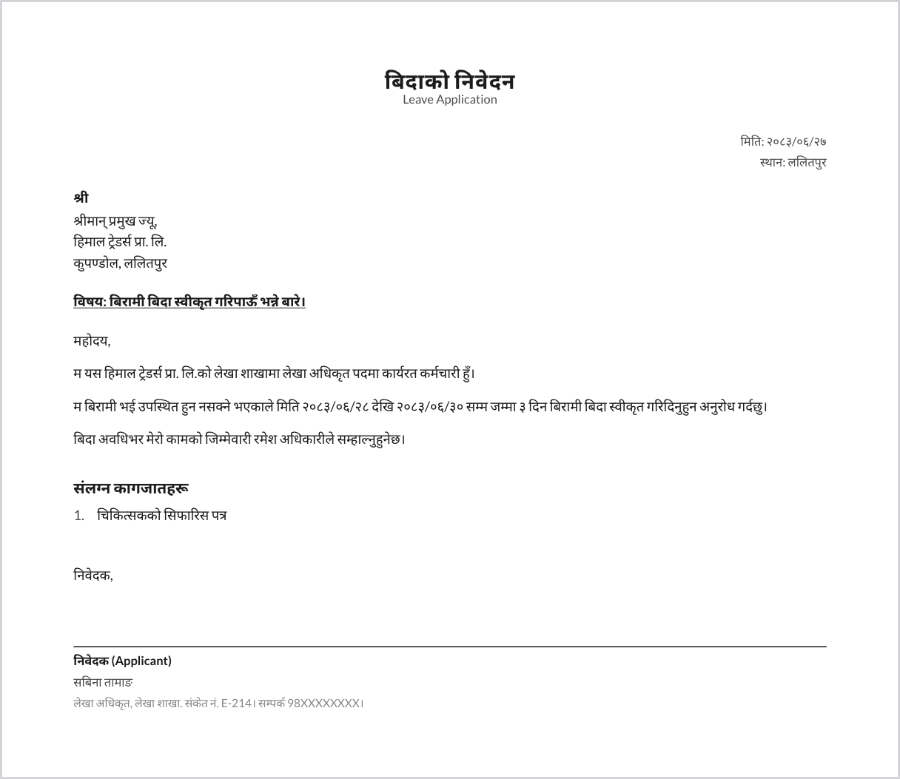
बिदाको निवेदनको नमुना — sample you can copy
मिति: २०८३/०६/२७
श्रीमान् प्रमुख ज्यू,
हिमाल ट्रेडर्स प्रा. लि.
कुपण्डोल, ललितपुर
विषय: बिरामी बिदा स्वीकृत गरिपाऊँ भन्ने बारे।
महोदय,
म यस हिमाल ट्रेडर्स प्रा. लि.को लेखा शाखामा लेखा अधिकृत पदमा कार्यरत कर्मचारी हुँ। म बिरामी भई उपस्थित हुन नसक्ने भएकाले मिति २०८३/०६/२८ देखि २०८३/०६/३० सम्म जम्मा ३ दिन बिरामी बिदा स्वीकृत गरिदिनुहुन अनुरोध गर्दछु। बिदा अवधिभर मेरो कामको जिम्मेवारी रमेश अधिकारीले सम्हाल्नुहुनेछ।
निवेदक,
सबिना तामाङ
लेखा अधिकृत, लेखा शाखा
In English: Subject: Application for sick leave. Respected Sir/Madam, I work at Himal Traders Pvt. Ltd. as Accounts Officer in the Accounts section. As I am unwell and unable to attend, I request sick leave from 2083-06-28 to 2083-06-30 (3 days). Ramesh Adhikari will look after my work while I am away. Yours faithfully, Sabina Tamang.
बिदाको निवेदन बनाउने — make a leave application online
- Choose who is asking (employee, teacher or student) and the kind of leave. The subject line and the opening sentence are written from those two choices.
- Enter who it goes to, then your own name, post or class, and department.
- Enter the dates from and to, the number of days, and who covers your work. Add a reason in your own words if the standard one does not fit.
- List anything you are attaching and choose Nepali or English. Download it as a PDF, or as a Word file you can still edit. It is free, there is no sign-up, and nothing you type is uploaded.
Common questions
बिदाको निवेदन कसरी लेख्ने?
मिति, सम्बोधन (श्रीमान् प्रमुख ज्यू वा प्रधानाध्यापक ज्यू), विषय, आफ्नो परिचय, कुन मितिदेखि कुन मितिसम्म कति दिन बिदा चाहिएको हो र किन भन्ने कुरा, अनि आफ्नो नाम र दस्तखत राखेर लेखिन्छ। माथिको फाराम भर्दा यो ढाँचा आफैँ तयार हुन्छ।
How do I write a leave application in Nepali for office?
Address it to the head of your office, write a subject line naming the leave, state your post, give the dates and the number of days with a one-sentence reason, and sign as निवेदक. Choose Nepali as the document language and the wording is filled in.
What should the subject (विषय) of a leave application say?
It names the leave in one line, for example बिरामी बिदा स्वीकृत गरिपाऊँ भन्ने बारे। or, in English, Application for sick leave. The tool writes it from the kind of leave you choose, and you can change it.
Do I need a medical certificate for sick leave?
For a day or two most offices do not ask. For a longer absence they usually want a doctor's note. Your office's own rules decide, so check them.
Can a parent write a leave application for a child?
Yes. Choose student, write the child's name, class and roll number, and the parent signs. Many schools ask for the parent's phone number on it.
Can I download the leave application as PDF or Word?
Yes, as a print-ready PDF or an editable Word file. A filled-in sample in both formats is on this page.
Is my information sent anywhere?
No. Everything stays in your browser. Nothing is uploaded, and there is no account unless you make one to sync your work across devices.
Last updated


